




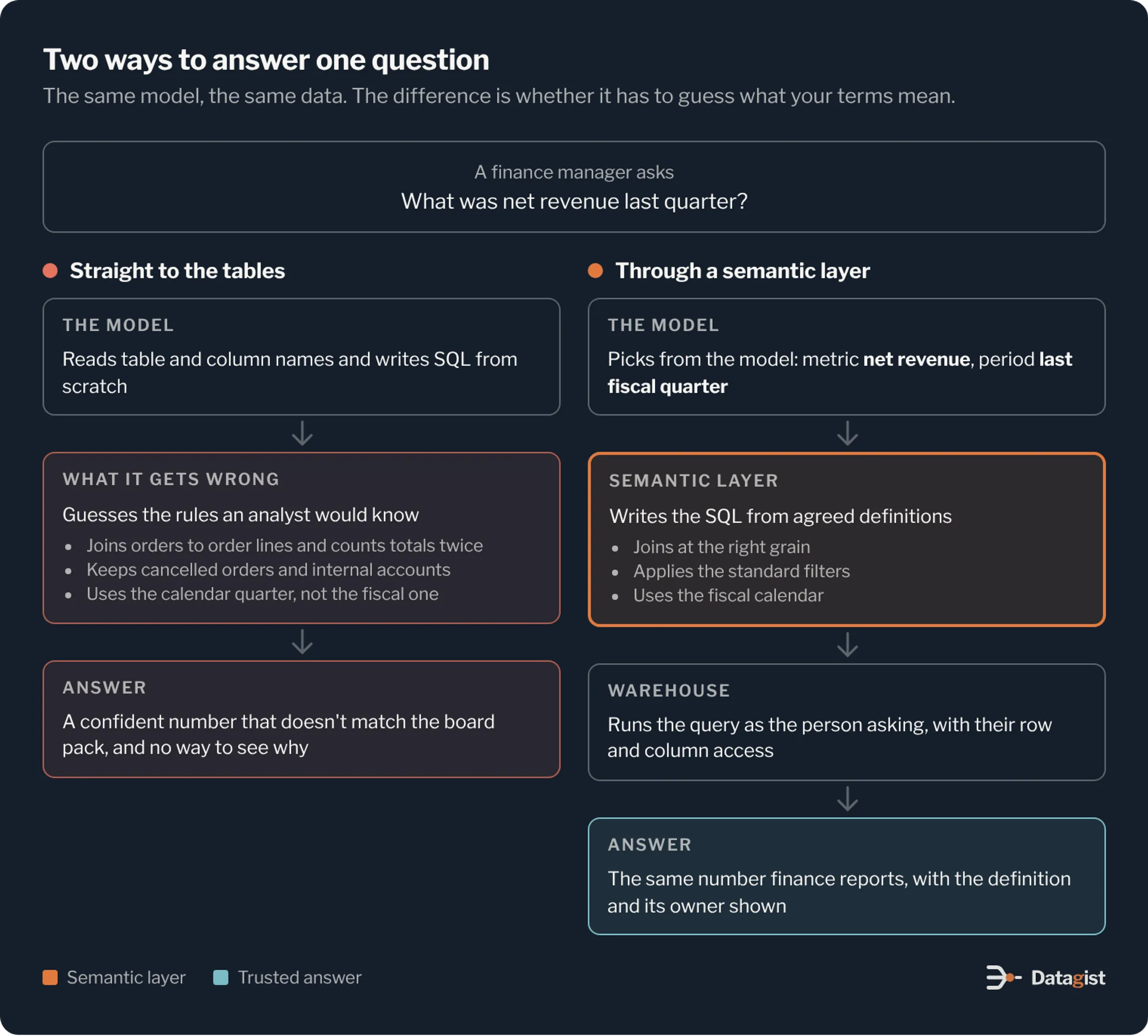
Ask a new AI assistant what net revenue was last quarter and you will get a number in a few seconds. The trouble starts when finance compares it with the figure in the board pack. The assistant counted orders that were later cancelled. It used calendar quarters, while the company’s fiscal year starts in February. It joined orders to order lines and added the order total once for every line.
The model didn’t fail here. It wrote valid SQL. It just didn’t know what your company means by net revenue, and nothing in the database told it. A semantic layer is where that meaning lives. This article covers why AI assistants need one, what goes into it, how the assistant should use it, and where to start.
Why AI gets business numbers wrong
Text to SQL on raw tables asks a language model to guess. It reads table names, column names and maybe a few sample rows, and works out what they probably mean. Columns called amt, status_cd or rev_adj give it very little to go on.
Most wrong answers come from the same few causes. Joins across tables at different grains count the same thing twice. Filters that every analyst applies, such as removing test accounts, internal orders or returns, are left out. Time is read as calendar time when the business reports on a fiscal calendar. And one word means different things to different teams. Sales may count an active customer as anyone with an open contract, while marketing counts anyone who logged in this month.
A human analyst learns these rules over months and applies them without thinking. A dashboard has them built in once, and someone checked the result before it went live. An AI assistant writes new SQL for every question, so it needs the rules written down where it can read them every time.
The hardest part is that a wrong answer looks just like a right one. It arrives quickly, in a clean table, with a confident sentence on top. People find out when two numbers disagree in a meeting, and after that they stop using the assistant.
What a semantic layer is
A semantic layer is a model of your business that sits between the warehouse tables and anything that reads them. It names the things people ask about and says exactly how to compute each one. BI dashboards, notebooks, apps and AI assistants all query through it, so the same question gets the same answer wherever it is asked.
It is written as code or configuration and kept in version control. A change to a definition goes through review like any other change, and you can see who changed what and when.
What goes into it
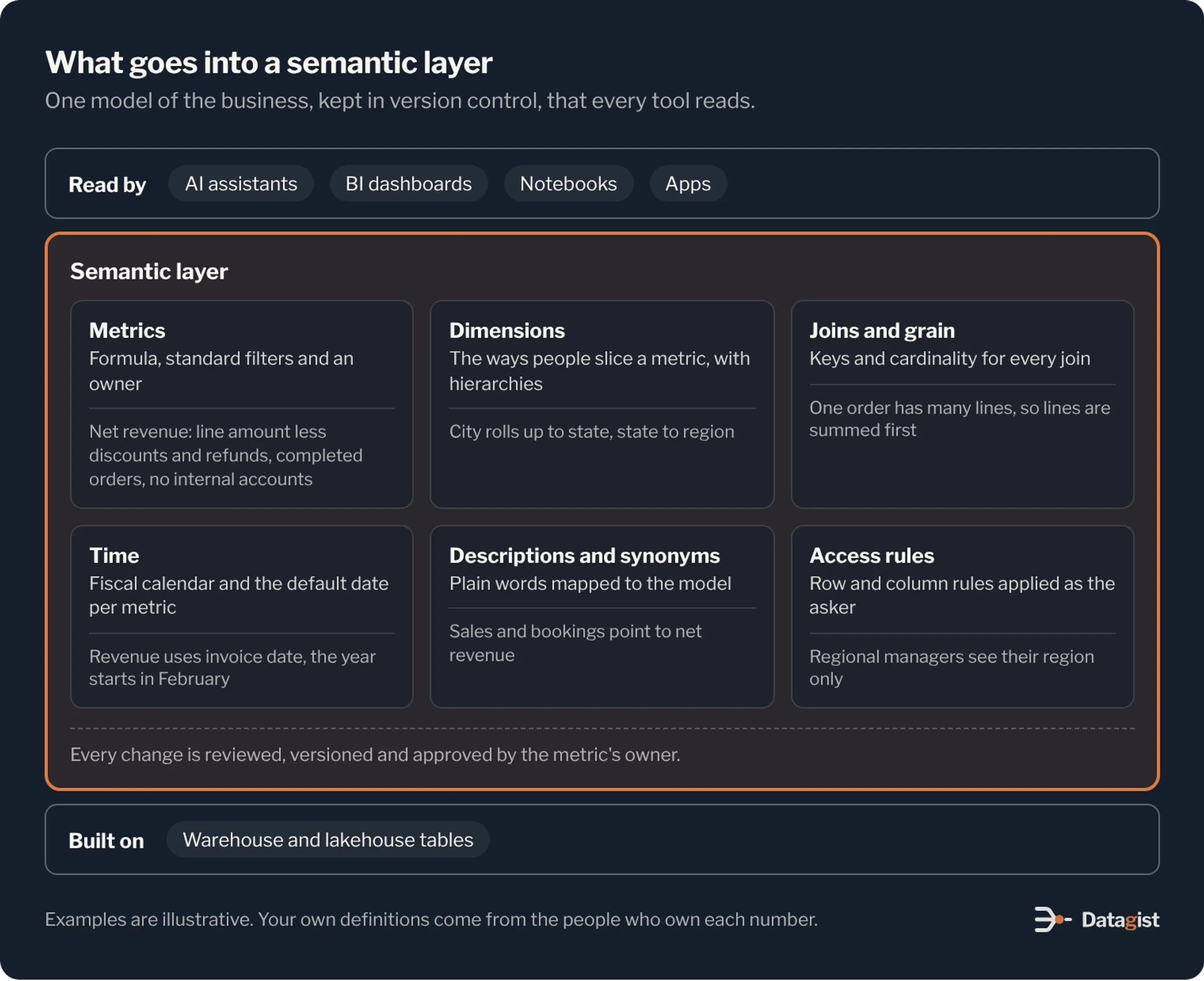
Metrics are the core. Each one has a formula, the table it comes from, the filters that always apply, and an owner. Net revenue might be the sum of line amounts less discounts and refunds, on completed orders only, with internal accounts excluded, owned by the financial controller.
Dimensions are the ways people slice a metric: region, product line, customer segment, sales channel. Hierarchies tell the layer that cities roll up to states and states roll up to regions, so a question about the West region adds up the right places.
Entities and joins describe how tables relate, with the key and the cardinality of each join. This is what stops double counting. When the layer knows that one order has many lines, it sums the lines before it joins them to orders.
Time needs its own care. Define the fiscal calendar once. Name the date each metric uses by default, such as order date, ship date or invoice date. Decide how partial periods are handled, so this quarter to date is compared with the same days last year.
Descriptions and synonyms help the model map plain words to the right object. People will ask for sales, bookings and revenue. Each word should point to the metric it means in your company, or trigger a clarifying question when it could mean more than one.
Access rules say who can see which rows and columns. The layer, or the platform under it, applies them as the person asking. A regional manager who asks the assistant about revenue sees their own region, the same as in any report.
How an AI assistant should use it
The safest design changes the model’s job. Instead of writing SQL from scratch, the model reads the question and picks from the semantic model: which metric, which dimensions, which filters and which time range. The semantic layer turns that request into SQL. The warehouse runs it under the user’s identity. Then the assistant writes the answer and shows the definition it used.
This split plays to each part’s strengths. Language models are good at understanding a loosely worded question. They are poor at remembering that refunds post to a separate table. A semantic layer is the opposite.
It also makes answers easy to check. When a user asks what net revenue includes, the assistant can show the formula, the filters and the owner. Someone in finance can confirm it in a minute, which is how trust builds.
Decide early what happens when a question falls outside the model. We suggest the assistant says so and offers the nearest metric it does know. If you allow free SQL as a fallback for analysts, label those answers as unverified so people can tell which numbers have been checked.
Where semantic layers live today
Most data platforms now include one. Snowflake has semantic views, which Cortex Analyst reads to answer questions. Databricks has metric views in Unity Catalog, which Genie and AI/BI dashboards use. dbt offers the dbt Semantic Layer, built on MetricFlow. Cube, AtScale and Looker’s LookML have provided semantic models for years, and Power BI semantic models play the same part for teams on Microsoft.
The right choice depends on where your data and your AI assistant already live. A layer built into your warehouse is simplest when one platform serves most users. A standalone layer helps when several platforms and BI tools need the same definitions. The Open Semantic Interchange effort, started by a group of vendors in 2025, aims to let definitions move between tools, which should make switching easier over time.
Whatever you choose, keep the business definitions portable. Next to the code, write each metric’s meaning, formula and owner in plain language. If you change tools later, that agreement is the part that took the most work.
Trust comes from testing
A semantic layer makes good answers possible. Testing shows that they are good.
Build a set of test questions with known right answers, taken from figures finance has already signed off: last quarter’s revenue, year end headcount, the churn rate in the last board pack. Run them against the assistant after every change to a definition, synonym or instruction, and keep the scores. A new synonym can fix one question and quietly break another, and the test run shows you which.
Log every question users ask and every answer they get. Review the log weekly for the first few months. Questions the model can’t answer tell you which metrics to add next. Answers people mark as wrong usually point to a missing synonym or a definition two teams read differently.
Give each metric an owner who approves changes to it. When the definition of an active customer changes, the owner signs off, the version moves forward, and every dashboard and the assistant pick up the change together.
The trade-offs
The upfront work is real. Agreeing on definitions takes time with finance, sales and operations, and some of those conversations are hard. That work is also the point. A company that can’t agree on what revenue means will get inconsistent answers from any tool, with or without AI.
A semantic layer also limits what the assistant can answer. Questions about data that isn’t modelled get an honest reply that the assistant can’t answer yet. Early users sometimes find that frustrating. Most come to prefer it once they see a guessed number that would have gone into a board deck.
Plan for performance too. Generated queries can be heavy on large tables. Pre-aggregated tables or materialized views for the most asked metrics keep answers quick and warehouse costs steady.
Where to start
Pick one business area where people already argue about numbers, such as revenue, pipeline or customer counts. List the 20 or so questions leaders ask most often. Agree the definitions behind them with the people who own those figures, and model only those metrics and the dimensions they need.
Connect one AI assistant to that model, give it to a small group, and run the test set every week. When its answers match the signed-off figures and the group relies on them, add the next area. Each new area goes faster, because the calendar, the shared dimensions and the access rules carry over.
Our Metrics Layer Starter helps teams define each metric once, with an owner, and point every report and assistant at that definition. If you are planning an AI assistant on your company data, talk to us about the semantic layer it will need.