




A claims manager’s week is full of questions about numbers. How many open claims does each adjuster carry? Which auto claims have been open more than 90 days? Did average severity on water damage go up this quarter, and in which states? Why did incurred losses jump in September?
The data to answer these sits in the claims system, the policy admin system, the payments ledger and the reserve history. Many carriers run more than one claims system, left over from an acquisition or a product line that runs on its own platform. So each question goes to the analytics team as a ticket, and the answer comes back days later as a spreadsheet.
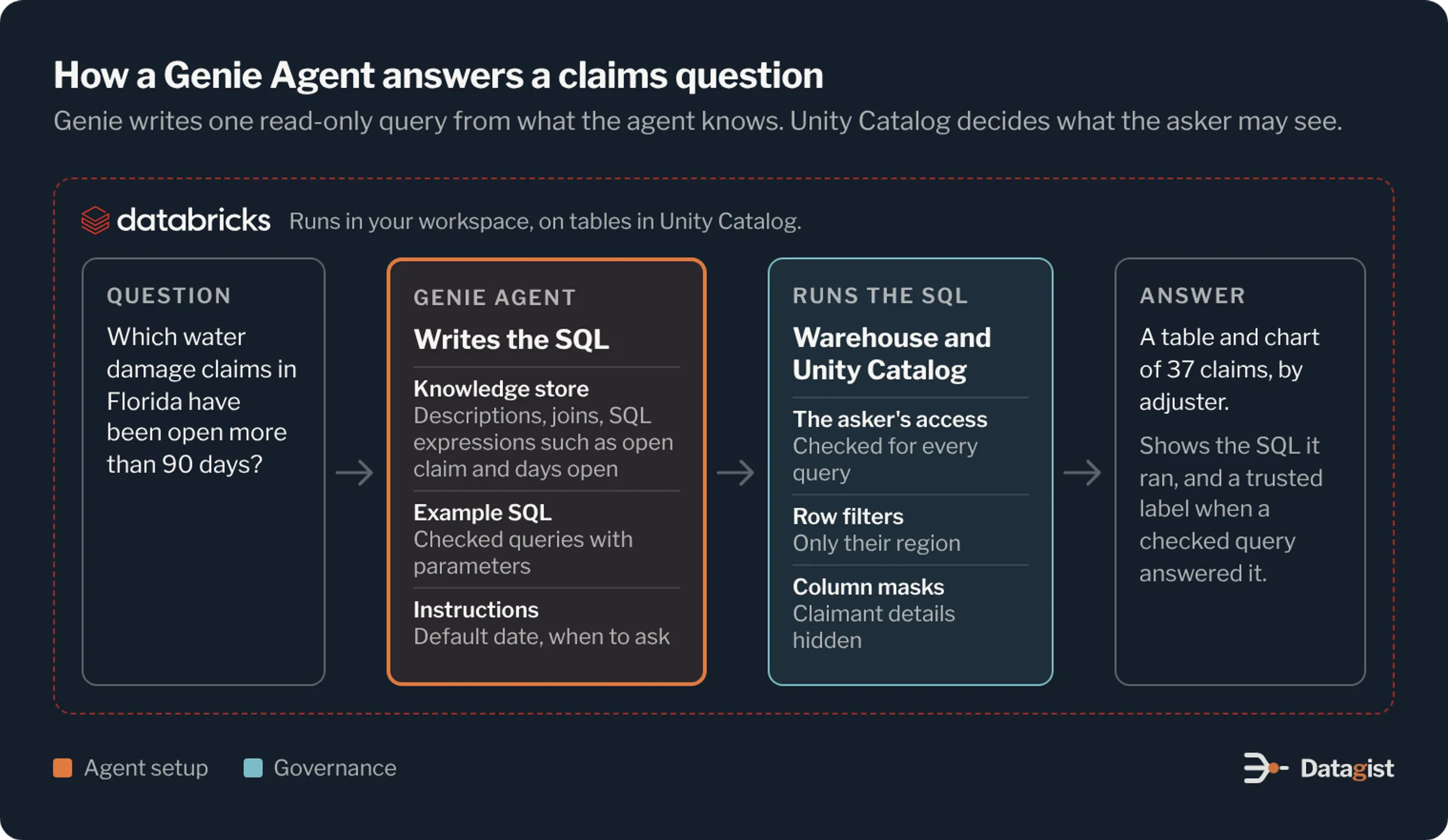
Genie, the natural language part of Databricks AI/BI, lets claims staff ask these questions in plain English and get an answer from governed tables, with the SQL shown. Genie One is the open chat for everyone in the company. A Genie Agent, called a Genie Space until this year, is set up for one subject and one group of users. This article covers how we design a Genie Agent for claims teams: the data model under it, the definitions and examples that make its answers right, the access controls, and how to test it before managers rely on it.
What goes into a Genie Agent
A Genie Agent is a configuration that sits on top of tables in Unity Catalog. Its parts are worth knowing before you design one.
Data sources are the tables, views and metric views the agent can query. An agent can hold up to 50, but Databricks recommends five or fewer, and that advice is right. Every extra table is another place for Genie to pick the wrong column.
The knowledge store holds table and column descriptions, synonyms, join relationships and SQL expressions. A SQL expression is a short piece of SQL saved under a business name. It can be a measure such as incurred loss, a filter such as open claims, or a field such as a severity band.
Example SQL queries and SQL functions are checked answers that Genie matches to questions. Give a query parameters and it becomes a trusted asset. When Genie answers from one, the user can see that the answer came from a verified query.
Text instructions give general guidance, such as how your fiscal year runs or how to round amounts. Databricks advises using them last, after the SQL options, because too many instructions make the agent less reliable.
Benchmarks are test questions with the SQL that gives the right answer. The Monitoring tab shows every question users ask and how they rated the answer.
In chat mode, Genie answers by writing one SQL query, which suits most claims reporting questions. Agent mode handles open questions in several steps, running more than one query and returning a short report. Both use the same agent setup, so the work below pays off in either mode.
Start with the questions claims managers ask
Collect real questions before building anything. Ask claims managers, supervisors and the analysts who answer their tickets. Look through last quarter’s ad hoc requests. Write each question down in the words people used, because those words become your synonyms and the titles of your example queries.
Then sort them by what they need. Most need one query against claim and transaction data. Some need policy data as well, such as earned premium for a loss ratio. A few, like why severity rose in one state, need several steps and suit agent mode. Keep the list. It becomes your benchmark set.
Build one claims model for Genie to read
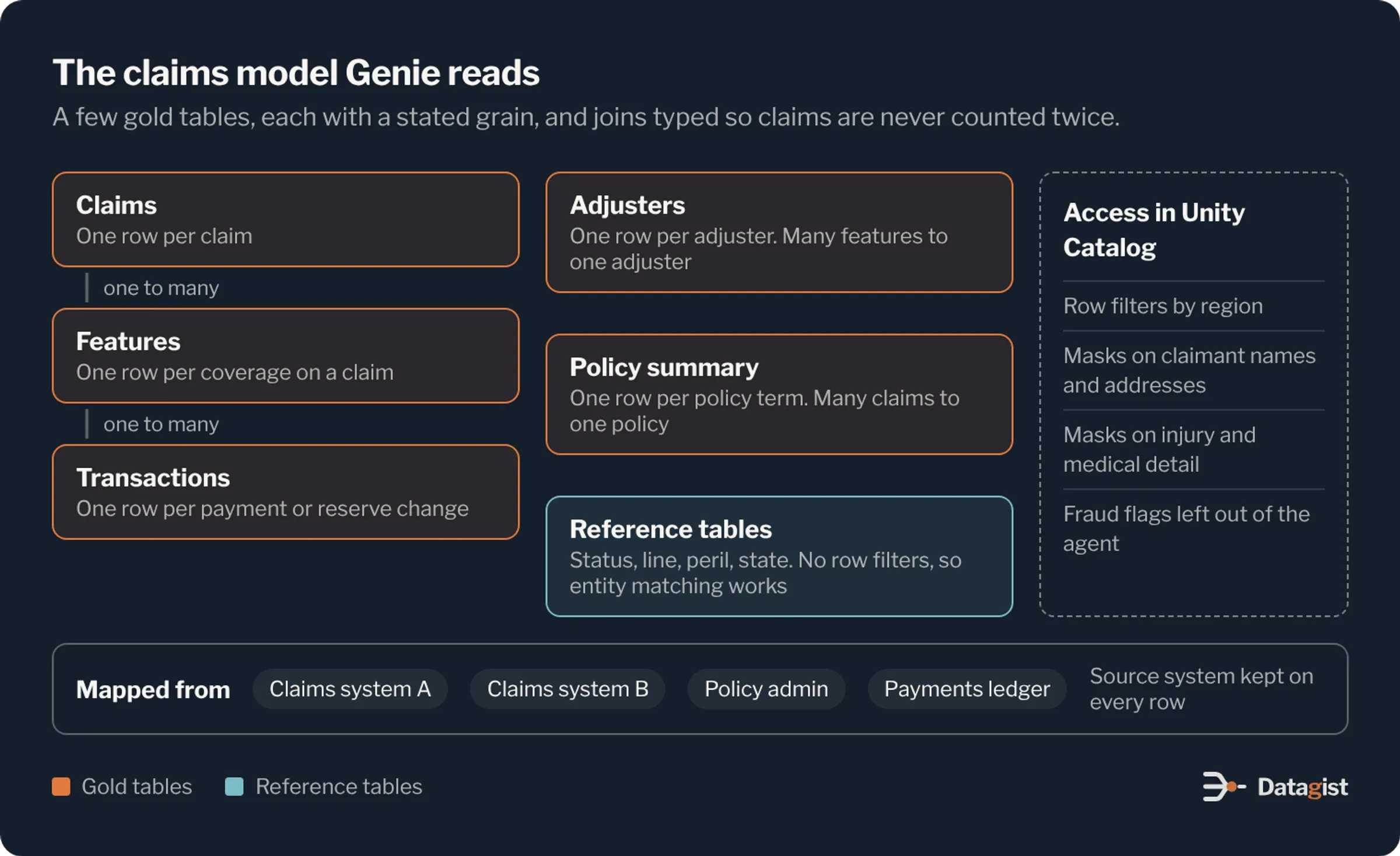
Genie writes better SQL against a small, clean model than against raw source tables. Build a gold layer for it with a handful of tables: claims, claim features, claim transactions, adjusters and a policy summary. Write a description for each table that says what one row means.
Grain is the first thing to get right. One claim can have several features, such as bodily injury and property damage on the same auto accident, each with its own reserve and adjuster. If Genie joins claims to transactions and counts rows, it counts the same claim many times. Set the join relationships with the right type, one-to-many from claim to feature and from feature to transaction, and give Genie a claim count measure that counts distinct claim IDs.
If you run more than one claims system, map each one to this model before Genie sees it. Map status codes to one list and line of business codes to another, and keep a source system column so analysts can trace any row back. Genie should never need to know that status CL in one system means the same as CLOSED in another.
Hide the columns people don’t ask about. Hiding a column only removes it from Genie’s view. The data and its permissions stay as they are.
Define each claims term once
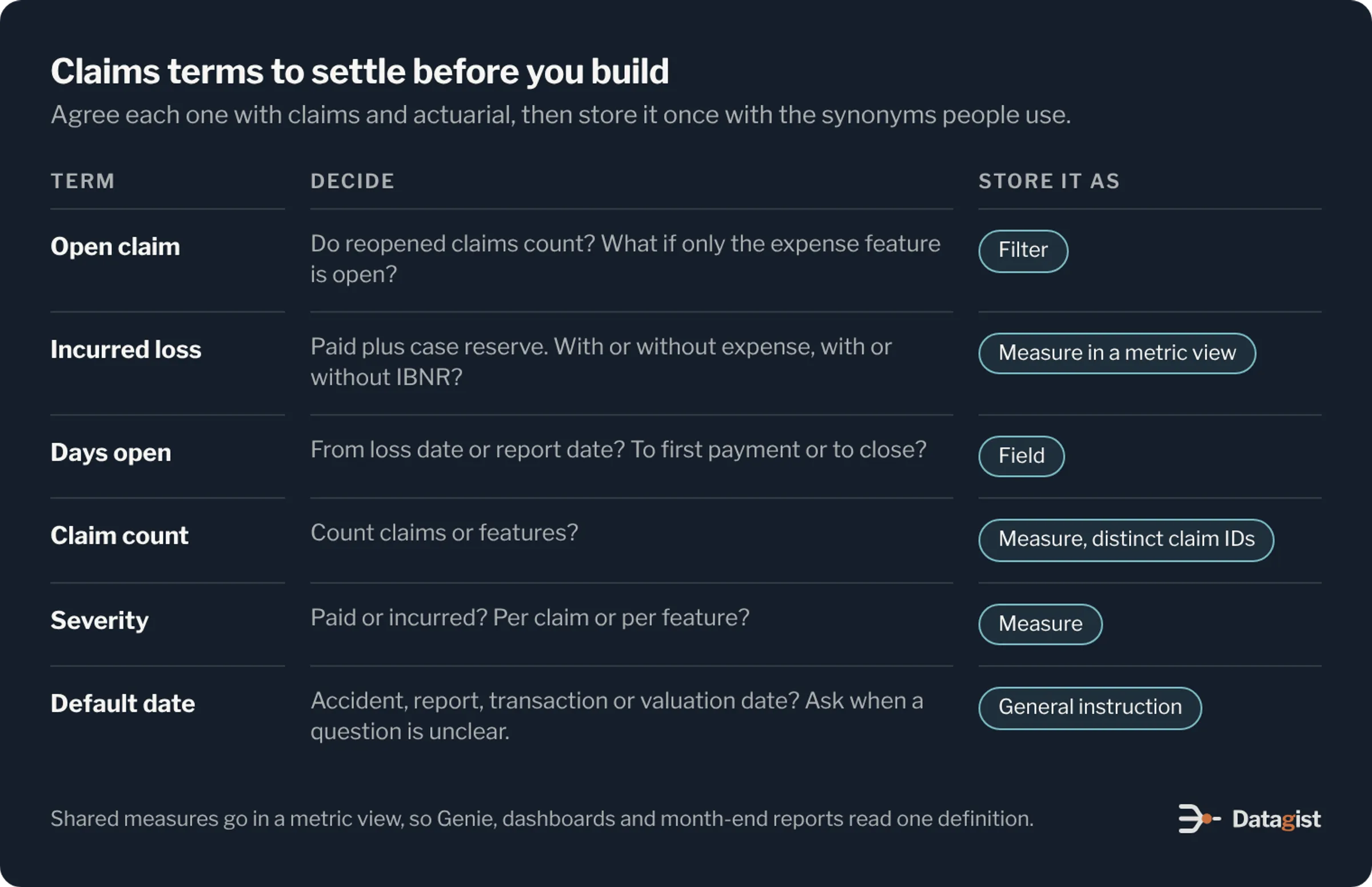
Claims has many terms that sound settled and are not. Does a reopened claim count as open? Is a claim open if its indemnity feature is closed and its expense feature is still open? Is incurred loss paid plus case reserves, and does it include expense or IBNR? Does cycle time run from the loss date or the report date? Different teams often give different answers.
Agree on these with claims and actuarial before you build, then write each one as a SQL expression with the synonyms people use. Open claims, pending claims and open inventory should all point to the same filter. For measures that finance and actuarial also report, such as incurred loss and loss ratio, use a metric view in Unity Catalog. Then Genie, dashboards and month-end reports all read one definition.
Dates need the same care. A claims question can be about accident date, report date, transaction date or valuation date, and each gives a different number. Say in the general instructions which date to use by default, and tell Genie to ask a clarifying question when a request could mean more than one.
Give Genie checked SQL for the common questions
Write example SQL for the questions managers ask most often: open inventory by adjuster, claims open more than 90 days, average paid severity by peril, reserve changes this month. Title each query the way a manager would ask it. Add parameters for line of business, state and date range, so one checked query covers many versions of the question and its answers show as trusted.
For logic too long for one query, such as a paid loss development triangle, register a SQL function in Unity Catalog and add it to the agent. Genie can call the function without seeing or changing its SQL. Users need EXECUTE permission on it.
Turn on entity matching for the columns people name in their questions: line of business, peril, state, claim status and adjuster team. Genie then filters on the exact stored value, such as peril = ‘WATER’, instead of guessing with a LIKE.
Protect claimant data with Unity Catalog
Claims tables hold sensitive data. There are claimant names and addresses, injury descriptions, medical bills on bodily injury and workers’ compensation claims, and special investigation flags. Genie checks data access as the person asking, so the row filters and column masks you set in Unity Catalog apply to every answer. A manager in one region sees that region’s claims. Medical details stay masked for anyone outside the injury team.
Plan for one trade-off. Entity matching can’t be turned on for tables that have row filters or column masks. Keep the values people search on, like peril, line and status, in small reference tables without filters, and join the claims table to them. Genie still matches names correctly, and the claims table stays protected.
Leave fraud flags out of a general claims agent. If investigators want Genie, give them an agent of their own with their own access.
Genie’s queries are read-only, so it can’t change a reserve or close a claim. Keep the same line for decisions. The agent reports on claims, and adjusters and managers decide on them. If your state has adopted the NAIC model bulletin on AI, add the agent to your AI inventory with its purpose and data sources.
Test before managers rely on it
Turn the question list into benchmarks, each with the SQL that gives the right answer. Run them after every change to a definition, example or instruction, and keep the scores. A new synonym can fix one question and break another, and the benchmark run shows you which.
Then give the agent to a small group of managers for a few weeks and ask them to rate each answer. Read the Monitoring tab every week. Most fixes are small: a missing synonym, a join with the wrong type, a definition two teams read differently. When someone rates an answer up, Genie may suggest new SQL expressions or joins from that query. Review each suggestion before you accept it.
Manage the agent as code with Declarative Automation Bundles, so each change is reviewed and moved from test to production like any other release.
Plan the cost
Every question runs SQL on a warehouse, so a busy agent adds warehouse time. Genie usage by people is free until January 31, 2027 and then billed as you go, while usage by service principals is already billed. Set budgets during the pilot and track how many questions each manager asks. That gives you a cost estimate for a wider rollout before billing starts.
Where to start
Pick one line of business and one group of users. Auto physical damage or homeowners property claims make a good first agent. Volumes are high, claims close quickly, and managers ask the same inventory and cycle time questions every week. Build the gold model for that line, agree on the definitions it needs, write the examples, run the benchmarks and hand it to one claims unit.
The second agent is quicker to build, because the claims model, the definitions, the reference tables and the test process carry over. Add casualty lines next, where long tails and reserve changes make the definitions matter even more. Then build an agent for finance and actuarial on the same metric views.
We build claims data platforms and analytics for insurers, including on Databricks. If you are planning Genie for your claims teams, talk to us about the model and definitions it will need.