




A utility keeps its data in more systems than most companies. Meter reads come from the AMI head-end. Asset records live in GIS and the work management system. Outage history sits in the OMS, and customer accounts in the CIS. Then there are the documents: inspection reports, maintenance manuals, switching procedures, tariff books and years of regulatory filings.
Most of the questions people ask on a normal day cut across several of these. A reliability engineer wants to know why one feeder keeps showing up in the outage numbers. A planner wants to know which transformers are overloaded and when they were last inspected. Today each of those answers is a ticket to the analytics team or an afternoon in spreadsheets.
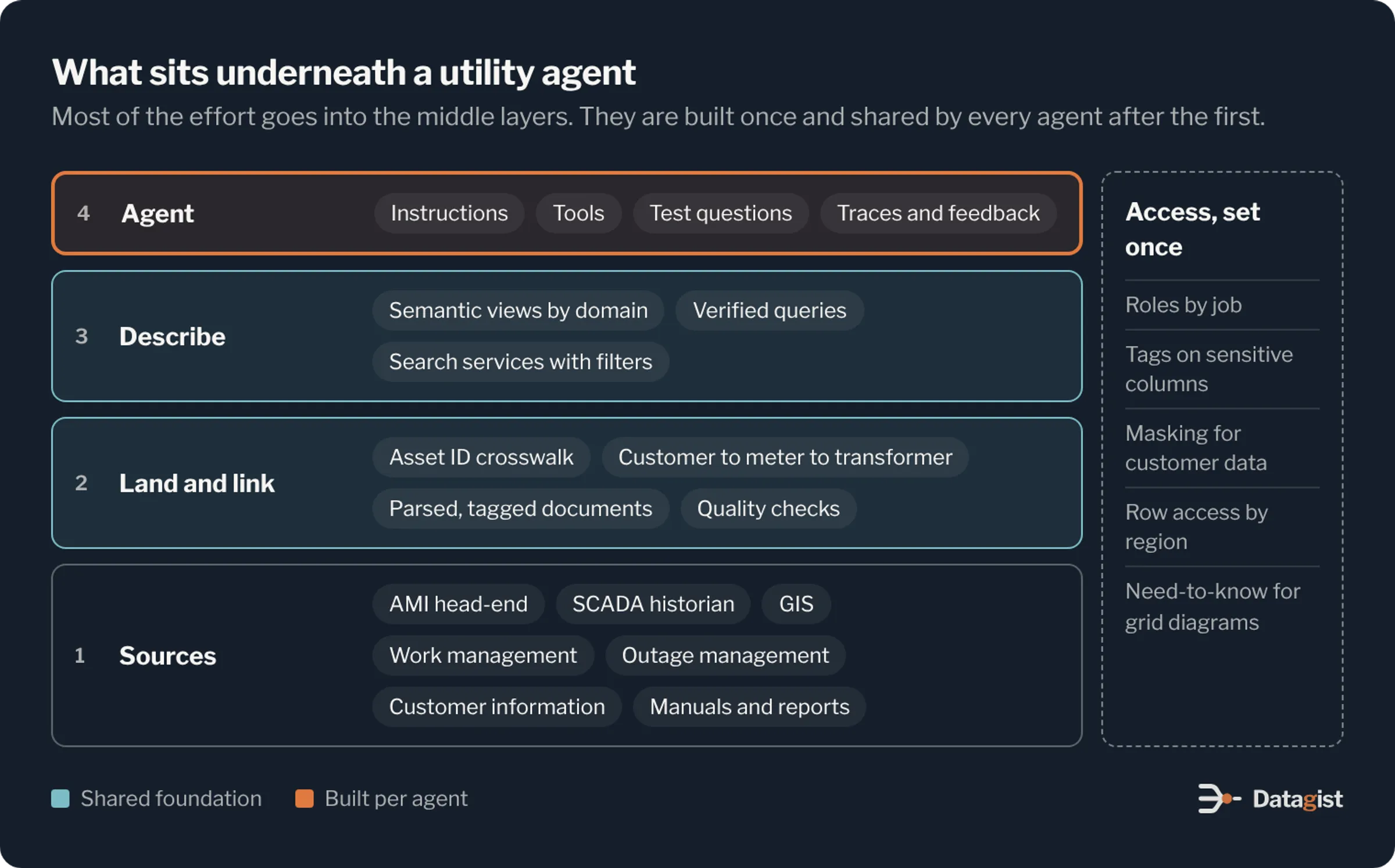
An AI agent can answer these questions directly, as long as it can query the tables, read the documents and respect who is allowed to see what. Snowflake Cortex provides the parts to build that inside the Snowflake account where the data already lives. This article explains how we design these agents for energy and utilities companies: the architecture, the data work underneath it, and the controls that make an agent safe to put in front of staff.
The parts of Cortex that matter for agents
Cortex is a set of AI services that run inside Snowflake. Four of them do most of the work in an agent.
Cortex Analyst turns a question into SQL. It works from a semantic view, which describes your tables in business terms: what a feeder is, how customer minutes interrupted are calculated, which column holds the meter ID. The quality of its answers depends almost entirely on that semantic view.
Cortex Search finds the right passages in text. You point it at a table of document text, such as parsed inspection reports or procedure manuals, and it builds the index and keeps it current as new rows arrive.
The AI functions, such as AI_PARSE_DOCUMENT, AI_EXTRACT and AI_CLASSIFY, run in SQL. They turn PDFs and free-text notes into rows and columns before an agent ever sees them.
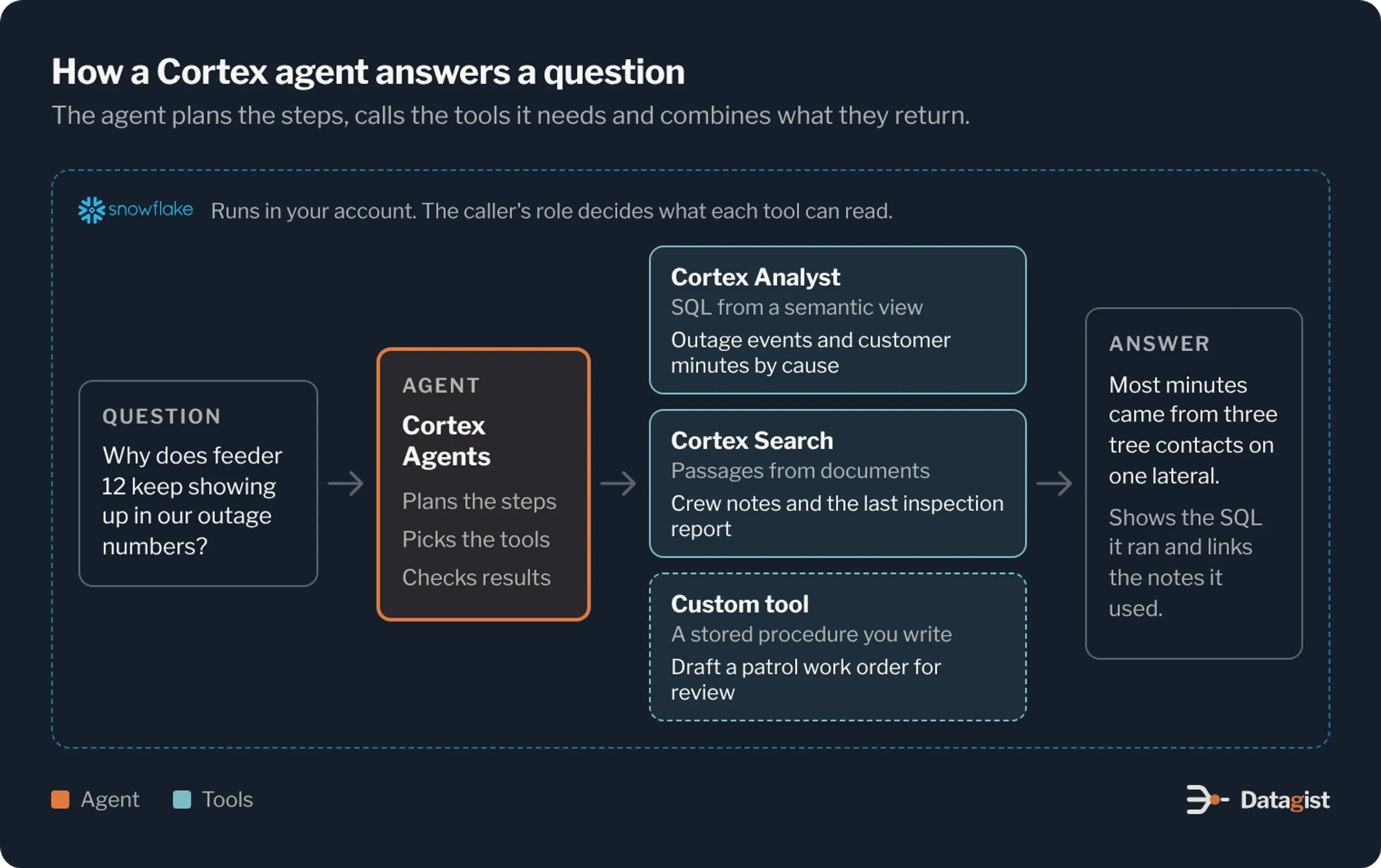
Cortex Agents ties these together. An agent is an object in a schema with instructions, a model and a list of tools. When a question comes in, it plans the steps, calls the tools it needs, checks what comes back and writes the answer. Tools can be Cortex Analyst, Cortex Search or custom tools you write as stored procedures. Staff can use the agent through Snowflake’s chat interface, or your developers can call it through the REST API from an app the field crews already use.
Start with the questions people ask
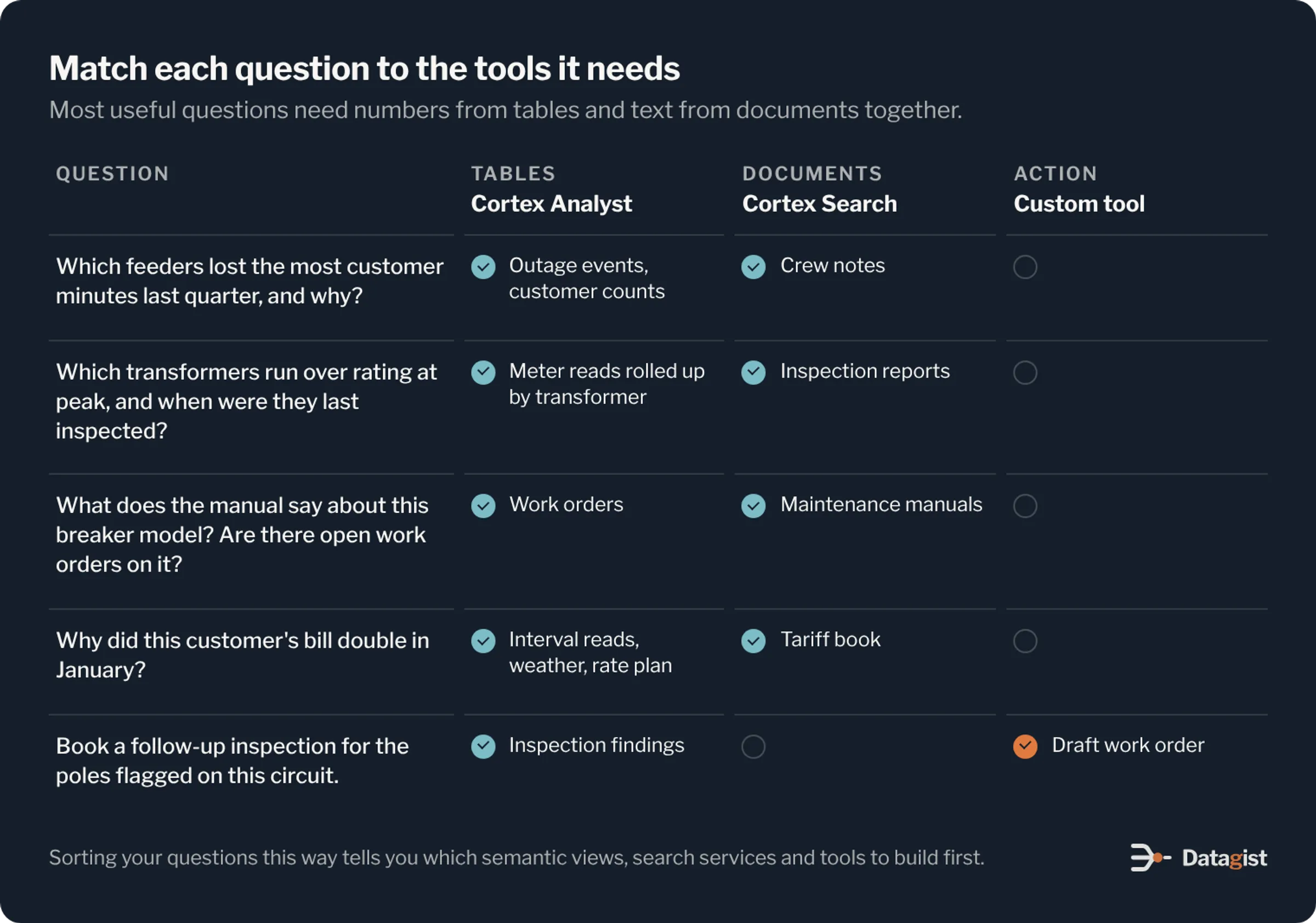
The first design step is a list of real questions, collected from the people who will use the agent. Ask for the questions they answered by hand last month, and the ones they gave up on because the data was too hard to pull together.
Then sort each question by what it needs. Some need numbers from tables, some need text from documents, and the most valuable ones need both. A few ask the agent to do something, like book an inspection. This sorting tells you which semantic views, search services and custom tools to build, and in what order. Keep the list. It becomes your test set later.
The semantic view is where accuracy comes from
When an agent returns a wrong number, the cause is usually the semantic layer and rarely the language model. Utilities have many terms with more than one meaning. A customer can be a premise, a service point, an account or a meter. An outage can be momentary or sustained, and the rules for excluding major event days change SAIDI and SAIFI a lot.
Write each definition into the semantic view once, with the synonyms people actually use and the join paths between tables. Add verified queries for the questions asked most often, so Cortex Analyst starts from SQL a person has checked. Keep semantic views in version control and deploy them like code. A change to a metric definition changes every answer that uses it, so it deserves a review.
Keep each semantic view focused on one domain. Separate views for reliability, assets and work, and customer and billing work better than one large view of everything. The agent can call more than one view to answer a question.
Link each asset across systems
Many agent questions follow one asset through several systems. The same transformer has an ID in GIS, another in the work management system, a tag in the SCADA historian, and meters behind it in the CIS. If those IDs are not linked, the agent cannot connect an overload to an inspection finding.
Build an asset crosswalk table that maps each physical asset to its ID in every system, and keep it current as equipment is replaced. Do the same for customers: link each account to its service point, meter and the transformer that feeds it. This work is unglamorous, and it is what makes cross-system answers possible.
Prepare documents before you index them
Utilities have decades of PDFs. Parse them with AI_PARSE_DOCUMENT, split them into sections that keep headings and tables together, and store each section with metadata: document type, asset class, equipment model, region and effective date.
That metadata matters more than people expect. It lets the agent filter a search to the right equipment model, or to the procedure version in force today, instead of returning a close match from a superseded manual. For inspection reports, go a step further and use AI_EXTRACT to pull each finding into columns such as asset ID, condition rating and recommended action. Then findings can be counted and joined like any other table.
Control access with the roles you already have
Utilities hold two kinds of data that need care. Customer data includes names, addresses, usage patterns and payment history. Grid data can include critical energy infrastructure information, such as detailed network diagrams and substation layouts, that should only reach people with a need to know.
Cortex Agents takes its permissions from the context of the request, so an agent can only use the tables, search services and tools the caller’s role can reach. Your existing Snowflake access model carries over. Tag sensitive columns, apply masking and row access policies from those tags, and give each group of users a role that matches the job. A call center rep sees the customer’s own account. A planner sees load by transformer with no names attached.
Test this the same way you test answers. Ask the agent the same questions under each role and confirm it masks or leaves out what it should.
Let agents act, with a person approving
Custom tools let an agent do things as well as answer. A stored procedure can draft a work order, open a ticket or schedule a customer callback. Start with read-only agents. When you add actions, have the tool create a draft that a person approves in the system of record. Keep anything that touches grid operations out of the agent entirely. Switching and control stay in the operational systems, with their own safeguards.
Test before people rely on it
Turn the question list from the first step into an evaluation set, with the expected answer for each question. Run it every time you change a semantic view, a search service or the agent’s instructions, and track the score over time.
Cortex Agents keeps threads, traces and user feedback, so when someone reports a wrong answer you can see which tool was called and what SQL ran. Review these every week for the first few months. Most fixes turn out to be small: a missing synonym, a missing join, or a document loaded without its metadata.
Where to start
Pick one group of users and one domain. For many distribution utilities, reliability reporting is a good first agent. The data is already in tables, the metrics have formal definitions, and engineers spend real time answering the same questions for management and regulators. Build the semantic view, load the outage cause notes into Cortex Search, test with the engineers’ own questions and put it in front of them.
The second agent costs less than the first, because the asset crosswalk, the document pipeline, the roles and the test harness are already in place. Add an asset and maintenance agent next, then customer service, and let each one build on the work before it.
We design data platforms and AI agents for energy and utilities companies, including on Snowflake. If you are planning an agent on Cortex, talk to us about the data work it will need.