




FERN (Flexible Entity Resolution Network) is Reltio’s AI-based match engine. It runs next to your match rules and finds duplicates that rules usually miss, like nicknames, initials, names in other scripts, and badly formatted addresses.
Reltio released FERN in its 2024.1 platform release in February 2024. It uses a pretrained language model, so you don’t train it on your data. You map your attributes, pick a mode, and it starts scoring pairs.
This post covers how it works, how to turn it on, and how we would roll it out.
The problem with match rules
A Reltio match rule is a fixed recipe. You pick the attributes, a comparator for each one (exact, fuzzy, phonetic, numeric), cleansers to normalize values, and match tokens that decide which records get compared. When a rule fires, it either auto-merges the pair or creates a potential match for a data steward.
Rules are predictable, which is good. The catch is that a rule only catches what you told it about. “Bill” and “William” match only if you have a nickname list. “Mohammed” and “Muhammad” match only if a phonetic comparator groups them. “J. R. Mehta” and “Jayesh Ramesh Mehta” look like two people to a fuzzy comparator. “Intl. Business Machines” and “IBM Corp” barely share any characters.
You can fix each case with another cleanser, synonym list, or rule. But there is always another case. So you end up with duplicates no rule catches, and a steward queue that keeps growing. Loosening the rules to catch more is risky, because a wrong merge is much harder to undo than a missed one.
How FERN works
FERN is a second match engine. It looks at the same records as your rules, and its results go into the same match actions. Stewards work one queue, no matter which engine found the pair.
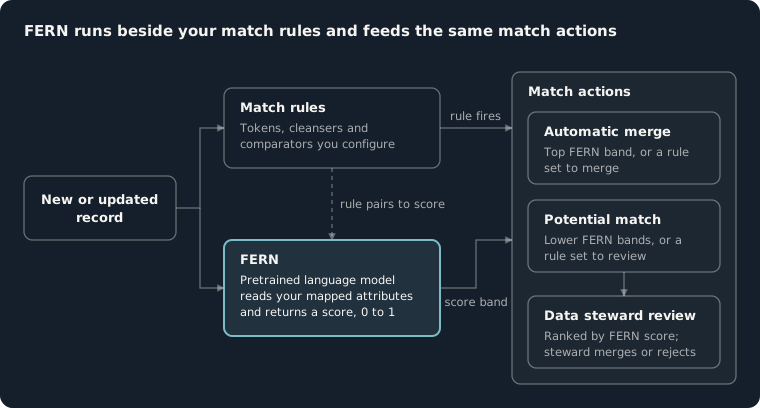
It works in two steps:
- Find candidate pairs. FERN turns attributes like names and addresses into vectors. Records that mean the same thing end up close together, even if they are spelled differently.
- Score each pair. A pretrained language model compares the two records and returns a score from 0 to 1. The model already knows how names, nicknames, initials and addresses vary across languages and regions.
You don’t train the model on your data, and each tenant’s data stays separate.
You decide what each score means. High scores can auto-merge, lower scores become potential matches. FERN can also score the potential matches your rules already created, so stewards can sort their queue by confidence.
Turning it on
FERN is a paid add-on and you enable it per entity type. Reltio has pretrained models for individual and organization entity types. The velocity pack docs list which entity types have one.
You need tenant admin rights, or a custom role with MDM:config.businessModel UPDATE and CatalogService READ.
In the Console, go to Data Modeler > Entity types, pick the entity type, and open the Match tab. The model shows up in the AI-powered table as “Pretrained FERN for” plus the entity type name. Pick the latest version and set these four things.
Mode. There are three:
| Mode | What it does |
|---|---|
| FERN for data steward | Scores the potential matches your rules already created |
| FERN enhanced discovery | Finds new pairs your rules missed |
| FERN Full Mode | Does both in one run |
Leave the mode empty to turn FERN off for that entity type.
Scope. Match internal records, external records (for example third-party data), or both. You can also limit matching to operational values.
Attribute mapping. Map your attributes to the inputs the model expects, such as name and address. You can map more than one attribute to the same input, and add optional “other attributes” for extra context.
Score bands. You can set up to three score ranges, each with an action: auto-merge or potential match. The ranges have to touch. If the top one is 0.90 to 1.00, the next one has to end at 0.90. Those numbers come from Reltio’s docs as an example. Pick your own based on testing.
Save, then run the Rebuild Match Table task so existing records get scored.
Rules vs FERN
| Aspect | Match rules | FERN |
|---|---|---|
| How it decides | Comparators, cleansers and tokens you set up | Pretrained model on the attributes you map |
| Setup | Built and tuned per entity type | Map attributes, pick a mode, set score bands |
| Training on your data | No | No |
| Good at | Exact IDs, hard business rules, known patterns | Nicknames, initials, other scripts, abbreviations, messy addresses |
| Output | Rule fires, then an action | Score, then an action based on its band |
| Can you explain a match? | Yes, point to the rule that fired | You get a score, not a reason |
| Use it for | Auto-merges you need to defend | Finding missed pairs and sorting the steward queue |
Keep rules for things that must never be wrong, like “never merge two records with different tax IDs”. Use FERN to catch more and to sort the review queue.
How we would roll it out
Reltio recommends starting slow, and we agree. Do it in three steps and only move on when the current step looks good.
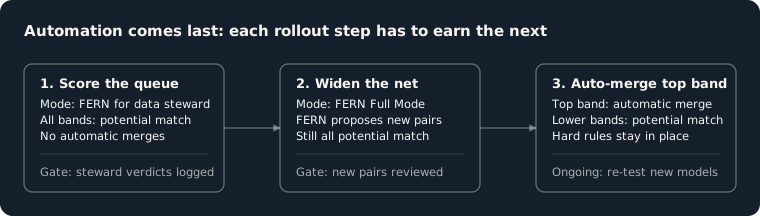
Step 1: Score the queue. Use FERN for data steward and set every band to potential match. Nothing auto-merges. Stewards work as usual, but the queue is sorted by FERN score, and their decisions get recorded. Over time you get a set of FERN-scored pairs that a person has checked.
Step 2: Find new pairs. Switch to Full Mode so FERN also suggests pairs your rules never found. Keep everything as potential match. Review the new pairs closely. This is where FERN helps most, and also where it can make mistakes your rules wouldn’t. Watch for people at the same address, family members, and different branches of the same company.
Step 3: Auto-merge the top band. Use the steward decisions to find the score above which FERN is almost always right. Make that band auto-merge and leave the rest as potential matches. Keep your hard rules. A high score doesn’t make a merge right if it breaks a business rule.
Some things that help:
- Build a labeled sample of your own records first, so you can test FERN and your rules against the same answers.
- Count wrong merges and missed matches separately. Fix wrong merges first. They cost more.
- Double-check attribute mappings. FERN only sees what you map, and a bad mapping lowers scores without any error.
- Test again before upgrading to a new model version. Scores can change between versions.
Summary
FERN adds a second match engine to Reltio that handles names and addresses much like a person would. You don’t write rules for it or train it. It works best alongside your rules: rules block the merges that must never happen, and FERN finds and ranks what the rules miss. Start with scoring, check it against your own data, and only then turn on auto-merge.
Our Master Data Starter comes with match rules, a stewardship workflow, and a precision check that runs in your pipeline. You can use the same check to compare FERN with your current rules. If you’re planning to add FERN to a Reltio tenant, get in touch.